GitHub Repository Optimization Suite for Claude Code
Most GitHub repos have no keywords in the description, no structured README, missing license files, zero community health signals. Search engines skip them. Developers scroll past. Claude GitHub scores your repo 0-100 and generates every fix.
git clone https://github.com/avalonreset/claude-github.git && cd claude-github && bash install.sh
Works on macOS, Linux, Windows. Requires Claude Code + GitHub CLI.
About the Claude GitHub Suite
What It Does
Claude GitHub is an open-source skill suite for the Claude Code CLI. It provides 8 specialized skills that analyze, score, and improve GitHub repositories across 6 weighted categories: README quality, metadata and discovery, legal compliance, community health, release and maintenance, and search discoverability. Not affiliated with Anthropic or GitHub, Inc.
How Scoring Works
When you run the /github audit command, the suite spawns 6 parallel scoring agents. Each one evaluates your project against detailed rubrics with specific point values, producing a 0-100 health score and a prioritized remediation plan. This analysis covers everything from README structure to search visibility. Every skill generates production-ready files including LICENSE, SECURITY.md, CONTRIBUTING.md, CITATION.cff, issue templates, CHANGELOG entries, and search-optimized README content.
Key Features
- Open-source and MIT-licensed
- 8 skills covering health checks, legal, community, release, search visibility, metadata, README, and portfolio optimization
- 6 parallel scoring agents for sub-2-minute full assessments
- Live keyword data via DataForSEO integration (optional)
- AI-generated banner images via KIE.ai integration (optional)
- Works on Windows, macOS, and Linux
- Requires Claude Code CLI and GitHub CLI (gh)
From Invisible to Discoverable
The Problem
Most GitHub projects are invisible to search engines and AI assistants. They have no keywords in the description, no structured README, missing license files, and zero community health files. Search engines cannot index what they cannot parse. AI systems like ChatGPT, Perplexity, and Google AI Overviews skip repositories that lack structured data.
The Fix
Claude GitHub fixes this in one pass. Run a 6-category assessment, identify every gap, and generate production-ready files for each issue. The workflow follows a standard operating procedure: diagnose with /github audit, research keywords with /github seo, generate fixes with targeted skills, then re-run the analysis to measure improvement.
8 Skills. One Suite.
Every recommendation cites its source: DataForSEO keyword volume, GitHub API metadata, codebase analysis, or reference guides. Nothing is guesswork. See the getting started guide for installation.
- /github audit - Score any repository 0-100 across 6 categories with prioritized fixes, spawns 6 agents in parallel
- /github legal - Select a license, generate SECURITY.md, CITATION.cff, handle fork compliance and attribution
- /github community - Generate issue templates, CONTRIBUTING.md, CODE_OF_CONDUCT.md, .gitattributes, CI workflow, devcontainer
- /github release - Plan release strategy, CHANGELOG, badges, semantic versioning, and package distribution
- /github seo - Run keyword research with real search volume and difficulty data via DataForSEO
- /github meta - Optimize description, topics, homepage URL, feature toggles, and social preview image
- /github readme - Generate or rewrite your README with search-optimized headings and AI-generated banner images
- /github empire - Portfolio strategy, profile README, AI avatar generation, cross-linking, and topic sync
0-100 Health Score
Parallel Agent Architecture
The scoring system uses 6 specialized agents that run in parallel. Each agent evaluates one category using a detailed rubric with specific point values, not subjective impressions. The final score is a weighted sum of all six categories.
Category Weights Explained
README Quality carries the highest weight at 25% because it is the primary surface developers, search engines, and AI assistants use to understand a project. Metadata and Discovery at 20% evaluates signals GitHub uses for search ranking and Explore recommendations. Legal Compliance, Community Health, and Release and Maintenance each carry 15%, covering files that signal project maturity. Search Discoverability at 10% checks keyword placement and AI citation readiness. After scoring, the tool generates a numbered remediation plan with the highest-impact fixes listed first.
- README Quality (25%) - structure, headings, badges, table of contents, code examples
- Metadata and Discovery (20%) - description keywords, topics, homepage URL, feature toggles
- Legal Compliance (15%) - license file, SECURITY.md, CITATION.cff, fork obligations
- Community Health (15%) - issue templates, CONTRIBUTING, CODE_OF_CONDUCT, devcontainer
- Release and Maintenance (15%) - releases, CHANGELOG, CI badges, dependabot, recency
- Search Discoverability (10%) - keyword placement, GitHub Explore signals, AI citability
| Category | Weight | What It Checks |
|---|---|---|
| README Quality | 25% | Structure, headings, badges, table of contents, code examples |
| Metadata and Discovery | 20% | Description keywords, topics, homepage URL, feature toggles |
| Legal Compliance | 15% | License file, SECURITY.md, CITATION.cff, fork obligations |
| Community Health | 15% | Issue templates, CONTRIBUTING, CODE_OF_CONDUCT, devcontainer |
| Release and Maintenance | 15% | Releases, CHANGELOG, CI badges, dependabot, recency |
| Search and Discoverability | 10% | Keyword placement, GitHub Explore signals, AI citability |
5-Minute Setup
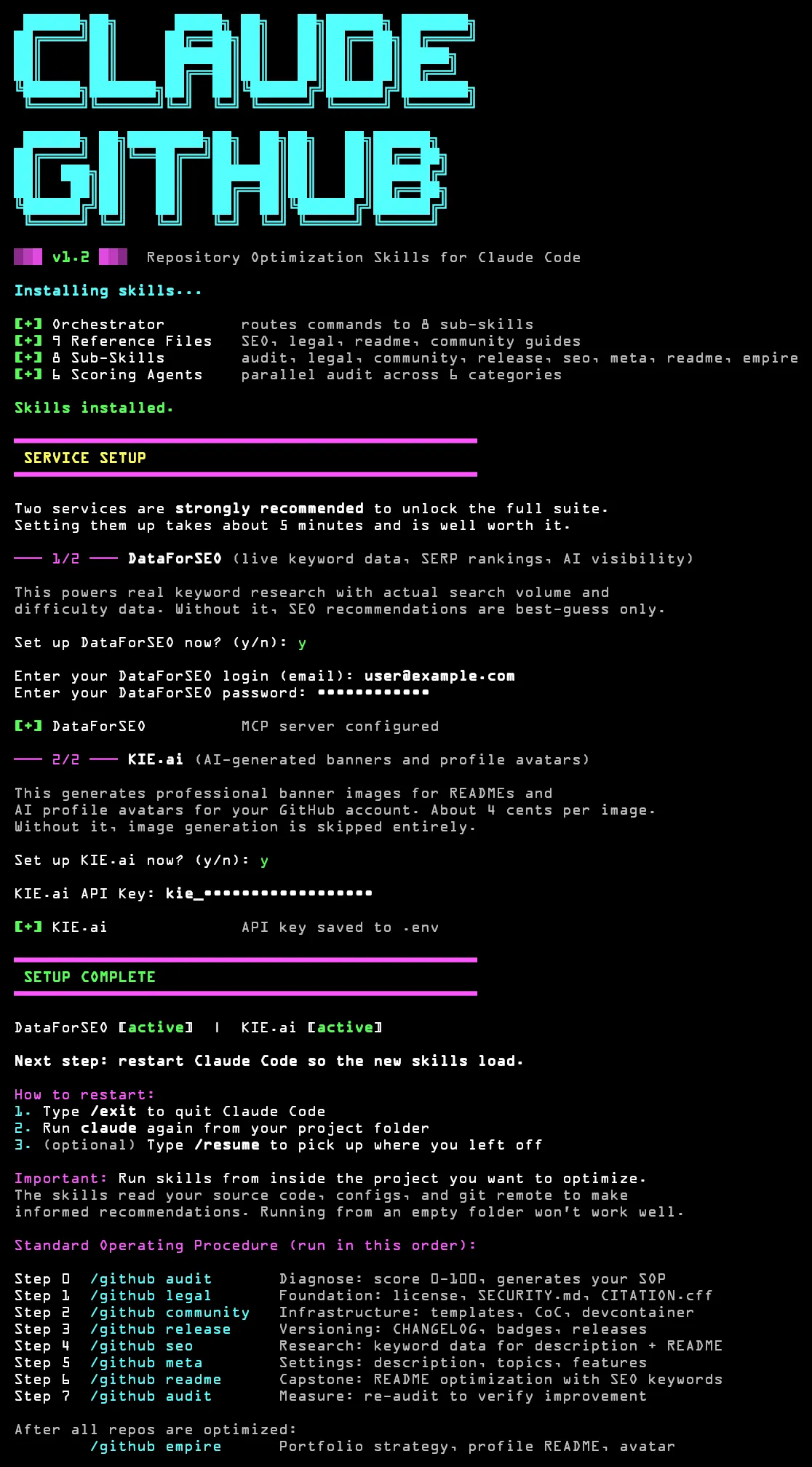
The installer copies all skills and configures DataForSEO + KIE.ai for live keyword data and AI-generated banner images.
Follow the SOP
The assessment generates a numbered remediation plan. Run each skill in order - each one hands off to the next. Read the full walkthrough for details on each category.
- Step 0: /github audit - Diagnose by scoring 6 categories and generating your SOP
- Step 1: /github legal - Foundation with license, compliance, and fork obligations
- Step 2: /github community - Infrastructure with templates, CoC, and devcontainer
- Step 3: /github release - Versioning with CHANGELOG, badges, and catch-up releases
- Step 4: /github seo - Research keyword data for description and README
- Step 5: /github meta - Settings for description, topics, and features using keyword data
- Step 6: /github readme - Capstone README optimization using everything above
- Step 7: /github audit - Measure by re-running the review to verify improvement
Questions
Common Questions About Claude GitHub
Before and After: claude-github Repository
The full optimization workflow ran on the claude-github repository itself. Here is what changed after one pass through the standard operating procedure.
Score Comparison: avalonreset/claude-github
Before Optimization
After One Pass
What Changed
- README: Added table of contents, badge row, structured headings, and code examples for every command
- Metadata: Optimized description with target keywords, added 12 topics, set homepage URL, enabled all feature toggles
- Legal: Generated MIT LICENSE, SECURITY.md with vulnerability reporting policy, and CITATION.cff
- Community: Created 3 issue templates, CONTRIBUTING.md, CODE_OF_CONDUCT.md, and devcontainer config
- Releases: Tagged v1.0.0 with semantic versioning, generated CHANGELOG.md, added CI badge
- Discoverability: Placed keywords in first 100 characters of description, added alt text to images, improved AI citability
Scores reflect the claude-github repository's own assessment run. Results vary by project - repositories with existing documentation typically start higher. The full process took about 15 minutes of developer time plus roughly 3 minutes of agent processing.
STOP BEING INVISIBLE.
8 skills. 6 parallel agents. Live keyword data. One install command. Your projects deserve to be found. Read our guides on GitHub search keywords and README optimization to learn more.
Meet the Developer

About Claude GitHub
Claude GitHub is a repository optimization suite built by Avalon Reset for the Claude Code command-line interface. It is not a product of Anthropic or GitHub, Inc. The suite provides 8 specialized skills and 6 parallel scoring agents that assess, score, and improve GitHub projects across README quality, metadata and discovery, legal compliance, community health, release management, and search visibility. Every recommendation is data-backed through DataForSEO integration for live keyword research with real monthly search volume, keyword difficulty, and SERP competitor analysis. KIE.ai integration provides AI-generated banner images for README files. The suite is open-source under the MIT license and works on Windows, macOS, and Linux. It was scaffolded with skill-forge and uses search optimization methodology adapted from Claude SEO. Built by Avalon Reset.
- Repository: github.com/avalonreset/claude-github
- License: MIT open source
- Version: 1.2.0
- Author: Benjamin, Avalon Reset
- Platform: Windows, macOS, Linux
- Requirements: Claude Code CLI, GitHub CLI (gh)